
Introduction to Web API
August 28, 2025
What is a web API?
Application Programming Interfaces, or APIs have been around for long. These API’s gained more interests when internet grew. Conceptually a web API is an interface between a server which has hosted the web api and a client requesting to access some resources of the hosted web API. Programmatically, the hosted web API has some public methods exposed which takes into some parameters, headers configuration etc. to respond with an appropriate responses.
However the more internet grew, new technological advancements and their standards acceptable across internet emerged. The SOAP protocol was introduced first as many companies were trying to layout strict rules in terms of client-server communication. This also web altogether to the consumer-based market. As more interest grew many commercial companies like eBay or Amazon started publishing the API which are more flexible and can be used publicly. Following these companies many social sites started their own API’s for public communication.
Many social sites also developed new way of communication called REST (Representational State Transfer) protocol. This is nowadays most used API protocol.
Structure of an API Request:
1. Endpoints
A very important part of an API request is the endpoint. Without this we cannot communicate. This needs to be specified as an uniform resource locator. An example is https://anapioficeandfire.com/api/ .
2. Actions
Actions specify which operation we need to perform using the endpoint. So these can be GET,PUT,POST,DELETE,UPDATE,PATCH,OPTIONS,HEAD. Most of the times we use POST, GET , PUT, and DELETE which signifies CRUD like in database.
P.S: CRUD- create, read, update and delete.
3. Parameters
Another important part of any API request is to access correct resource with some parameters. So technically this means that a public method which exposed for some operation allows client to interact and filter the data.
Request parameters look like below which allow us to access similar objects:
Further with the example shown in point 1, we can use it like https://anapioficeandfire.com/api/books . The bold part illustrates the parameter name.
Query parameters allow us to access and filter
Further with the example shown in point 1, we can use it like https://anapioficeandfire.com/api/books/1 . The bold part illustrates the parameter name and value.
4. Headers
Every request has this part required for server to correctly respond to the request, Most of the time we don’t notice as the tools like SOAPUI, POSTMAN they send headers in default manner based on the type of protocol.
We do not require to add more information on the headers unless some specific request requires to be access in that way.
5. Body
The body is required to be filled before making request of type POST or PUT where we want to manage some specific resource. This also means authorization and authentication is also required so that we can modify or add any new resource.
6. Response
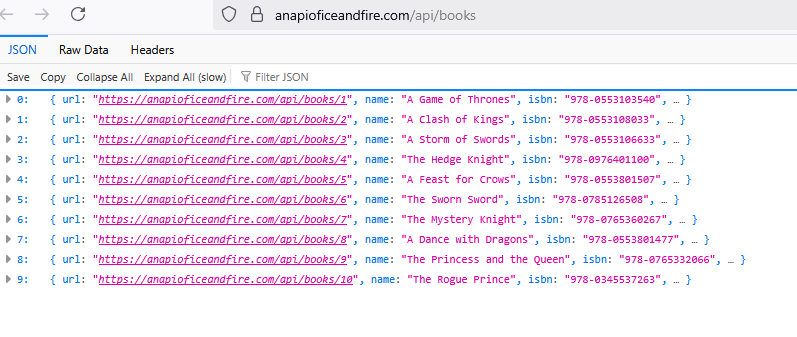
Very important aspect of these API is the response, where we see what has been returned by the server based on our requests. This may also include cookies, headers etc. information along with the response in the body. This response can be in json format, xml format etc. completely depends on headers while making requests.
Below is a great example for Response and Response headers:

So let’s continue our journey on API testing by installing POSTMAN and making our first API Call.

